
| I’ve spent most of this year embedded with a team run by Eugenio Pace in the patterns & practices group at Microsoft working on three books (with more to come). The first two have already been published — see the links on the right. You can also view the content on MSDN:
The first book includes an introduction to the Windows Azure Platform, and then describes how the fictional Adatum company migrates its existing ASP.NET expense reporting application to the cloud. The book looks at the mechanics of how Adatum performs the migration as well as examining the significant design decisions made by Adatum, the trade-offs it had to consider, and the cost implications. For example, the original, on-premises application used SQL Server as its data store. Adatum had to decide whether to go with SQL Azure for the cloud-based version of the application, which would be simple to implement, or expend more development effort to port the storage functionality in the application to Windows Azure table and blob storage. The second book describes a “green field” scenario where the fictional Tailspin company is developing an online surveys application. With a new application, Tailspin in not constrained by any existing design decisions or implementation choices, but can chose which features of the Windows Azure platform to use. The design decisions addressed in the book include how to make the Surveys application a multi-tenant cloud application, and how to make the application scale on demand (for example to handle a customer creating a survey that they expect to get a million responses to in the week before Christmas). The Tailspin Surveys application will make a reappearance in a forthcoming book on Windows Phone 7 development, where a Windows Phone 7 device will become a client application enabling users to complete surveys on their phone. Both books also have companion, downloadable code that you can use to explore exactly how these two companies chose to implement their applications for the Windows Azure platform, and hands-on labs that will guide you through some of the specific areas of the the implementations. Next year, there will be third book on Windows Azure that will provide coverage of some of Windows Azure platform functionality not used by Adatum and Tailspin, for example the Access Control Service, and bring things up to date with some of the new features appearing in in the Windows Azure platform. |
Friday, 3 December 2010
Where Next with the Cloud?


Thursday, 2 December 2010
Serious Guidance for Serious SharePoint Developers

Earlier this year, I was lucky enough to spend several months working with the patterns & practices team at Microsoft, producing guidance for developers and architects on working with SharePoint 2010—check out the Developing Applications for SharePoint 2010 pages on MSDN. The guidance includes:
- Documentation that provides deep technical insights into core aspects of SharePoint 2010 development
- Deployable reference implementations with a realistic level of complexity
- "How To" documentation on tricky tasks
- A library of utility classes that you can use in your own SharePoint applications
The guidance is primarily aimed at experienced SharePoint developers and architects who want a more sophisticated level of guidance. Rather than explaining the basics of SharePoint development, it aims to give you the information and resources you need to make effective architectural and implementation decisions. For example, the topics on sandboxed solutions provide a detailed insight into how sandboxed assemblies are loaded and executed, how resource monitoring and throttling criteria are applied, and how low-privileged process accounts together with CAS policies restrict the functionality of sandboxed solutions. In light of these insights, it goes on to explore exactly what you can and can't do with sandboxed solutions. Patterns & practices go to great lengths to make sure their guidance has real world relevance—the core team included two SharePoint MVPs, Todd Baginski and Rob Bogue, and every chapter and component was reviewed by an external "advisory council" consisting of leading industry figures in the world of SharePoint.
We've now distilled the core content from this guidance into a new book, Designing Solutions for SharePoint 2010. If you're new to SharePoint development, this probably isn't the book for you. However, if you already know your SPSite and your SPWeb and you're looking for deeper technical insights, then this could be a valuable addition to your bookshelf.
Tuesday, 23 November 2010
Drupal 7 and SQL Server Spatial Data
In a previous post, I explored integration between Drupal 7 and SQL Server Reporting Services. In this post, I’ll examine how you can take advantage of the fact that Drupal 7 can be installed on SQL Server to store geographic data using SQL Server 2008’s spatial data support, and also how you can integrate Bing Maps and Twitter geographic data into your Drupal site.
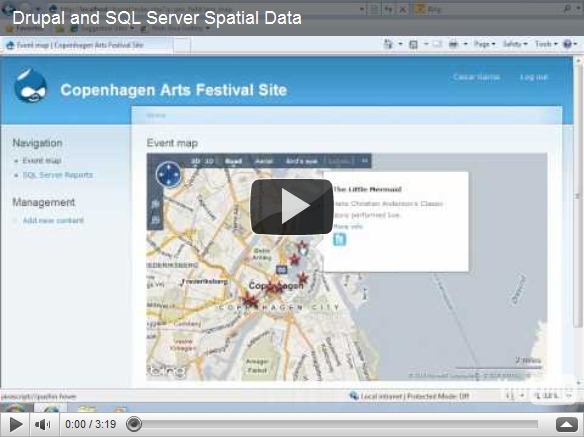
Microsoft introduced support for spatial data in SQL Server 2008 (see some of my past posts for details), and given that you can now install Drupal on Windows with a SQL Server content database, it makes sense to use this support to extend your Drupal site to include content with a geographical element. The scenario we decided to use when exploring this idea was a site for a local arts festival that includes the ability to publish details of events, including their location. However, you could easily adapt the idea for any content that has a location-based element. The video shows the solution we created (you can also view the video on YouTube).
Our solution not only incorporates spatial data that is stored in SQL Server, but also uses the Bing Maps control to visualize the spatial data, and retrieves tweets that include a geographic location from Twitter. This sort of “mash-up” approach where data and services from multiple sources on the Web are combined to create a rich user experience is the very essence of today’s most cutting edge Web applications, and when combined with the social/community-based publishing capabilities of Drupal it can be used to create some pretty compelling compelling solutions.
The diagram below shows the high-level architecture of the solution. Note that the SQL Server database forms the “data hub” of the application, storing the geographical data from both the Drupal content and the related tweets (which are retrieved and cached in the database periodically using the Cron scheduler in Drupal).

At the heart of the solution is a set of custom Drupal modules that we implemented in PHP. These are packages and installed in the Drupal site to add the required spatial data functionality. The first module we created, and the one on which the others all depend, is a module named GeoField that defines a Location field type that can be included in Drupal content types. The Location field type stores a geographical Longitude-latitude point in well-known text (WKT) format, which can easily be instantiated as a SQL Server geography data type instance. The module also defines a widget for setting Location values, which consists of a textbox and a Bing Maps control. Users can enter an address in the text box and geocode it using the Bing Maps API, or they can right-click a point on the map and reverse-geocode the address. The code to do the geocoding is implemented in JavaScript as described in a previous blog post. The following PHP functions define the field info and schema within Drupal:
function geo_field_field_info() {
return array(
'geo_field_Location' => array(
'label' => t('Location Data'),
'description' => t('A field for storing geographic data.'),
'default_widget' => 'geo_field_bingmap',
'default_formatter' => 'geo_field_simple_text',
),
);
}function geo_field_field_schema($field) {
$columns = array(
'location' => array('type' => 'varchar', 'length' => 255, 'not null' => FALSE),
);
$indexes = array(
'location' => array('location'),
);
return array(
'columns' => $columns,
'indexes' => $indexes,
);
}
The Bing Maps widget, and an alternative simple textbox-based widget, is defined with the following PHP code:
function geo_field_field_widget_form(&$form, &$form_state, $field, $instance, $langcode, $items, $delta, $element) {
$value = isset($items[$delta]['location']) ? $items[$delta]['location'] : '';
$element += array(
'#delta' => $delta,
);
$element['location'] = array();switch ($instance['widget']['type']) {
case 'geo_field_bingmap':
drupal_add_js('http://dev.virtualearth.net/mapcontrol/mapcontrol.ashx?v=6.3', 'external');
$element['location'] += array(
'#prefix' => '',
'#attributes' => array('class' => array('edit-field-geomap')),
'#attached' => array(
'js' => array(drupal_get_path('module', 'geo_field') . '/BingMaps.js'),
),
'#suffix' => '<div class="bing-map-control form-item form-type-textfield"><label for="txtAddress">Address</label><input type="text" id="txtAddress" class="form-text bing-map-address" size="60"/><input type="button" value="Find" class="location-search-button form-submit" class="form-submit" /><br/><div id="mapDiv" class="bing-map-edit bing-map" style="position:relative; width:400px; height:300px;"></div></div>',
);
case 'geo_field_geotext':
$element['location'] += array(
'#prefix' => '<div class="geo_field_geotext" style=" margin-top:20px; border: thin solid #808080;"><p>Enter a location:</p>',
'#type' => 'textfield',
'#default_value' => $value,
'#size' => 50,
'#maxlength' => 255,
'#suffix' => '</div>',
);
break;}
return $element;
}
Note the reference to the Bing Maps API and to the BingMaps.js JavaScript file, which includes the code used to handle the user interaction with the Bing Maps control.
The next task was to create a GeoEvent module that defines a content type for a festival event. This content type includes a Location field as well as more standard Drupal fields, such as a title, image, description, tags, and a simple text field to specify the date and time of the event.
The final module to be created was the GeoMap module, which defines the Event Map page on which events and tweets are plotted. The code in this module includes the following function, which retrieves the events from the Drupal database and returns them as a GeoRSS feed that can be imported into the Bing Maps control by client-side JavaScript code.
function geo_map_events() {
global $base_url, $language_content;
$results = db_query(
'SELECT r.title, b.body_value what, r.nid, w.[event_location_location] loc, geography::STPointFromText(w.[event_location_location], 4326).AsGml() [where] '.
'FROM node_revision r '.
'LEFT JOIN field_revision_body b ON r.nid = b.revision_id '.
'JOIN field_revision_event_location w ON w.revision_id = r.nid '.
'JOIN node n ON r.nid = n.nid '.
'WHERE n.type = \'event\'');
$items = '';
$addedItems = 0;
foreach ($results as $result) {
// We have to add in the namespaces here else the Bing control
// can't parse the content.
$xml = str_replace('<', '<gml:', $result->where);
$xml = str_replace('gml:/', '/gml:', $xml);
$description = $result->what != '' ? $result->what . '<br />' : '';
$description .= '<a href=\'index.php?q=node/' . $result->nid . '\'>More info</a> <br />';
$description .= '<a href="#' . $result->loc . '" class="twitter-button" > <img src="modules/geo_field/images/twitter.png" alt="Show nearby tweets" /> </a>';
$item_text = '<entry>'.
'<title>' . $result->title . '</title>'.
'<description>' . $description .'</description>'.
'<georss:where>' . $xml .
'</georss:where>'.
'</entry>';$items .= $item_text;
$addedItems++;
}if ($addedItems == 0) {
$placeholder_text ='<entry>' .
'<title>Placeholder</title>'.
'<description></description>'.
'<georss:where><gml:Point xmlns="http://www.opengis.net/gml"><gml:pos>-90 0</gml:pos></gml:Point>'.
'</georss:where>'.
'</entry>';
$items .= $placeholder_text;
}
$output = "<?xml version=\"1.0\" encoding=\"utf-8\"?>\n";
$output .= "<feed xmlns='http://www.w3.org/2005/Atom' xmlns:georss='http://www.georss.org/georss' xmlns:gml='http://www.opengis.net/gml'>\n";
$output .=
"<title>Festival Events</title>\n".
"<subtitle>Events for the 2010 festival</subtitle>\n".
"<author>\n".
"<name>Drupal Administrator</name>\n".
"</author>";
$output .= $items;
$output .= "</feed>\n";drupal_add_http_header('Content-Type', 'text/xml; charset=utf-8');
print $output;
}
Note that the query used to retrieve the data uses the SQL Server geography type’s STPointFromText function to instantiate a geography instance from the WKT representation of each location, and the AsGml method to then convert that geography instance to Geographic Markup Language (GML) format. This enables the code to simply embed the GML representation of the location into the GeoRSS feed (since a GeoRSS feed is in effect an XML representation of a collection of GML entities). If no locations are found, a placeholder location is created to avoid returning an empty feed.
The client-side JavaScript to request this feed and display the results as a layer on the Bing Maps control is in a script file named EventMaps.js, which is referenced by the Drupal page:
function showEvents() {
eventLayer.DeleteAllShapes();
var url = "index.php?q=geo_field/items_georss";
var veLayerSpec = new VEShapeSourceSpecification(VEDataType.GeoRSS, url, eventLayer);
map.ImportShapeLayerData(veLayerSpec, function(feed) {
var numShapes = feed.GetShapeCount();
for (c = 0; c < numShapes; c++) {
var shape = feed.GetShapeByIndex(c);
if (shape.GetDescription() == 'Placeholder' &&
shape.GetTitle() == 'Placeholder') {
eventLayer.DeleteAllShapes();
}
shape.SetCustomIcon("modules/geo_field/images/pin.png");
}}, false);
map.SetCenterAndZoom(new VELatLong(55.67630968987942, 12.569355145096778), 10);
}
Note that if the layer contains only a placeholder location (because there were no events), the location is deleted to produce an empty map.
The GeoMap module also includes a function that queries Twitter to return any tweets containing a specified hash-tag (which the administrator can set in the settings for the module). These tweets are then inserted into a table in the SQL Server database. The table includes a geography column in which the location of the tweet is stored.
function tweets_download() {
$tweetsfeed = "http://search.twitter.com/search.json?q=%23" . variable_get('geomap_hashtag', 'drupalcon');
$results = json_decode(file_get_contents($tweetsfeed), TRUE);
// Insert items into the table if they're not already there.
$insertquery =
"IF NOT EXISTS ".
"(SELECT * FROM dbo.tweets WHERE TwitterID = :tweetid1) ".
"INSERT INTO dbo.Tweets VALUES " .
"(:datetime, :tweeter, :content, geography::GeomFromGml(:location, 4326), :tweetid2)";
foreach ($results['results'] as $tweet) {
if ($tweet['geo'] != null) {
$pointdetails =
"<Point xmlns='http://www.opengis.net/gml'><pos>" .
$tweet['geo']['coordinates'][0] . ' ' . $tweet['geo']['coordinates'][1] .
"</pos></Point>";
$timestamp = strtotime($tweet['created_at']);
$sqldate = date('c', $timestamp);
$sqldate = substr($sqldate, 0, strlen($sqldate) - 6);
$params = array(
'tweetid1' => $tweet['id'],
'tweetid2' => $tweet['id'],
'datetime' => $sqldate,
'tweeter' => $tweet['from_user'],
'content' => $tweet['text'],
'location' => $pointdetails);
db_query(
$insertquery,
$params);
}
}
}
Note that the Transact-SQL query executed by the code uses the SQL Server geography data type’s GeomFromGml function to convert the value retrieved from Twitter into a geography instance before storing it in the table. This function is called by the Drupal Cron scheduler, so the table of tweets is updated periodically.
When the user clicks the Twitter icon for an individual event, the following PHP function is used to retrieve the tweets within 500m of the event and return them as a GeoRSS feed to be displayed on the map.
function geo_map_tweets_feed($location) {
// Use the location functionality in MSSql to query all tweets near a given
// location.
$results = db_query(
'SELECT Tweeter + \' (\' + cast(TweetDateTime as nvarchar(50)) + \')\' as tweeter, '.
'Tweet as tweet, '.
'TweetLocation.AsGml() as [where] '.
'FROM tweets '.
'WHERE TweetLocation.STIntersects(geography::STPointFromText(\'POINT(' . $location . ')\', 4326).STBuffer(500)) = 1');
$items = '';
$found = false;
foreach ($results as $result) {
$found = true;
$xml = str_replace('<', '<gml:', $result->where);
$xml = str_replace('gml:/', '/gml:', $xml);$item_text = '<entry>'.
'<title>' . $result->tweeter . '</title>'.
'<description>' . $result->tweet .'</description>'.
'<georss:where>' . $xml .
'</georss:where>'.
'</entry>';$items .= $item_text;
}
if (!$found) {
$items = '<entry>'.
'<title>Placeholder</title>'.
'<description>Placeholder</description>'.
'<georss:where><gml:Point xmlns="http://www.opengis.net/gml"><gml:pos>-90 0</gml:pos></gml:Point>'.
'</georss:where>'.
'</entry>';
}$output = "<?xml version=\"1.0\" encoding=\"utf-8\"?>\n";
$output .= "<feed xmlns='http://www.w3.org/2005/Atom' xmlns:georss='http://www.georss.org/georss' xmlns:gml='http://www.opengis.net/gml'>\n";
$output .= "<title>Festival Events</title>\n".
"<subtitle>Events for the 2010 festival</subtitle>\n".
"<author>\n".
"<name>Drupal Administrator</name>\n".
"</author>";
$output .= $items;
$output .= "</feed>\n";drupal_add_http_header('Content-Type', 'text/xml; charset=utf-8');
print $output;
}
Note that the WHERE clause of the Transact-SQL query executed by the code uses the STIntersects and STBuffer methods of the geography data type to find tweets within a 500m buffer of the event (which is instantiated as a geography instance by using the STPointFromText method as before).
As with the Reporting Services demo I blogged about previously, this solution we built was based on pre-beta releases of Drupal 7 and the related SQL Server driver for PDO and SQL Server module. To avoid the inevitable versioning issues that tend to arise with pre-release code dependencies, I haven’t includes the full source code. The plan is to publish it on CodePlex when the final release of Drupal 7 and the associated SQL Server components is available. Until then, hopefully you’ll find this article useful as an insight into the kinds of spatial data solutions you can build with Drupal and SQL Server.
Drupal 7 and SQL Server Reporting Services
Drupal is a popular content management system that until relatively recently has been associated more or less exclusively with the LAMP (Linux, Apache, MySQL, and PHP) Web development stack. However, Acquia Drupal is now available for Windows and can be installed with the Microsoft Web Platform Installer, and at DrupalCon in San Francisco, it was announced that a new SQL Server PHP driver for PDO and a SQL Server module for Drupal 7 would be released, enabling Drupal site data to be hosted in SQL Server. You can download a pre-release version of a Drupal and SQL Server package from here.

Drupal is highly extensible through its PHP-based modular architecture, and SQL Server includes a wealth of features that could potentially enhance the value of a community-based content site, so given that you can now install Drupal with SQL Server, it seemed logical to do some investigation into how you can integrate some of the capabilities of SQL Server into a Drupal site.
Perhaps the most obvious starting point is to integrate Reporting Services into a Drupal site to create a sort of “Community Dashboard” that includes reports showing content and author related activity within the site. SQL Server Express Edition with Advanced Services includes Reporting Services for free, and the SQL Server Reporting Services SDK for PHP provides a framework for accessing Reporting Services from PHP-based applications. The video shows the Drupal solution we created using these technologies (you can also view this video on YouTube).
The demo actually shows “bi-directional” integration between Drupal and SQL Server Reporting Services in the sense that not only does the site include a custom PHP module to “pull” the reports from Reporting Services into the Drupal site user interface, the reports themselves query data in the underlying Drupal content database, which in this instance is hosted in SQL Server 2008 R2 Express Edition.
The diagram below shows the high-level architecture of the integration solution we created. Note that the Reporting Services instance contains two folders – one containing reports that show activity for all users, and another containing reports that are filtered based on the current Drupal user’s ID. The custom module in the Drupal site ascertains whether the current user is an administrator, and if not retrieves the current user’s ID via the Drupal PHP API and passes it as a hidden parameter when retrieving the reports.

The reports query the tables in the Drupal content database. For example, the following query is used to retrieve the data for the Content Activity report:
SELECT n.Title Page,
cast(dateadd(ss,n.created,'1/1/1970') as Date) CreatedDate,
u.name Author,
c.[Subject] Comment,
uc.name [Commenter],
cast(dateadd(ss,c.created,'1/1/1970') as Date) CommentDate,
cn.totalcount PageViews
FROM dbo.Node n
JOIN dbo.Users u ON n.[uid] = u.[uid]
LEFT JOIN dbo.Comment c ON n.nid = c.nid
LEFT JOIN dbo.Users uc ON c.[uid] = uc.[uid]
LEFT JOIN node_counter cn ON n.nid = cn.nid
WHERE MONTH(cast(dateadd(ss,n.created,'1/1/1970') as Date)) = @Month
AND YEAR(cast(dateadd(ss,n.created,'1/1/1970') as Date)) = CONVERT(char(4),@Year)
Note that the date values in the Drupal database are stored in the standard UNIX format (the number of seconds since 1/1/1970), and so need to be cast to an appropriate SQL Server data type (we’ve used the Date datatype).
Our custom module code uses the SQL Server Reporting Services SDK for PHP to connect to and retrieve information from Reporting Services. For example, the following code is used to retrieve a list of available reports in the appropriate folder in Reporting Services (depending on whether or not the user is an administrator):
/*
connect to SQL Server Reporting Services and retrieve a list of available reports
*/
function getReports(){
module_load_include('php', 'ssreport', 'bin/SSRSReport');
$reports = array();
try
{
$ssrs_report = new SSRSReport(new Credentials(variable_get('ssreport_user'), variable_get('ssreport_password')), variable_get('ssreport_url'));
$childPath = "";
// if user is admin then load from community dashboard
if (user_access('Administer site configuration')){
$childPath = variable_get('ssreport_primary');
}
else{
// load from personal dashboard
$childPath = variable_get('ssreport_secondary');
}$catalogItems = $ssrs_report->ListChildren($childPath, true);
foreach ($catalogItems as $catalogItem) {
if ($catalogItem->Type == ItemTypeEnum::$Report) {
$reports[$catalogItem->Name] = $catalogItem->Name;
}
}}catch(SSRSReportException $serviceException)
{
drupal_set_message($serviceException);
}
return $reports;}
Note that the code uses a number of variable_get calls to retrieve global variables that are set in the Drupal administrative (such as the credentials to access the Reporting Services instance, the URL of the Reporting Services Web service, and the path to the CommunityDashboard and PersonalDashboard folders). Finally, the code uses the SSRSReport.ListChildren method provided by the SQL Server Reporting Services SDK for PHP API to retrieve the list of reports.
When a user selects a report, the following PHP function is used to retrieve the list of parameters that the report expects:
$rep=NULL;
if (user_access('Administer site configuration')){$rep = t(variable_get('ssreport_primary').'/@report',array('@report' => $report));
}
else{
$rep = t(variable_get('ssreport_secondary').'/@report',array('@report' => $report));}
// connect to SQL Server Reporting Services using the credentials and URL supplied in the administrative dashboard
$rs = new SSRSReport(new Credentials(variable_get('ssreport_user'), variable_get('ssreport_password')),variable_get('ssreport_url'));
$params = array();
try
{
// get the parameters for the specified report
$reportParameters = $rs ->GetReportParameters($rep, null, true, null, null);
$params = array();
foreach($reportParameters as $reportParameter)
{
array_push($params,$reportParameter->Name);
}
Finally, the following code is used to render the selected report in the Drupal user interface:
$rs = new SSRSReport(new Credentials(variable_get('ssreport_user'), variable_get('ssreport_password')),variable_get('ssreport_url'));
//get the report params array
$path = drupal_get_path('module','report_services');$reportParameters = $rs ->GetReportParameters($rep, null, true, null, null);
$params = array();
foreach($reportParameters as $reportParameter)
{
//code to set the parameter values}
$rs->SetExecutionParameters2($parameters);
// delete existing image files
$dirname = './images/';
$dir_handle = opendir($dirname);
if (!$dir_handle)
return false;
while($file = readdir($dir_handle)) {
if ($file != "." && $file != "..") {
if (!is_dir($dirname."/".$file))
unlink($dirname."/".$file);
else
delete_directory($dirname.'/'.$file);
}
}
closedir($dir_handle);$htmlFormat = new RenderAsHTML();
$htmlFormat->StreamRoot = './images/';
$result_html = $rs->Render2($htmlFormat,PageCountModeEnum::$Estimate,$Extension,$MimeType,$Encoding,$Warnings,$StreamIds);$i = 0;
// handle the images by writing them to the temp images folder
foreach ($StreamIds as $StreamId){$result_image = $rs->RenderStream($htmlFormat,$StreamIds[$i],$Encoding,$MimeType);
if (!$handle = fopen("./images/" . $StreamIds[$i] , 'wb'))
{
echo "Cannot open file for writing output";
exit;
}
if (fwrite($handle, $result_image) === FALSE)
{
echo "Cannot write to file";
exit;
}
fclose($handle);
$i++;
}
// construct the html of the report
$content="<div align='center'>";$content .="<style type='text/css'> td{border-top-width: 1px;border-top-style: solid;border-top-color: transparent;}</style>";
$content .="<div>";$content .='<div>';
/* add the report content */
$content .=$result_html;
$content .='</div>';
$content .='</div>';$content .='</div>';
Note that the report is rendered as HTML by the Render2 method of the SSRSReport class provided by the SQL Server Reporting Services SDK for PHP . If the report contains any images or charts, the method generates image files for these and stores them in a specified folder – hence the requirements to clear out the image folder before rendering the report to remove any images left over from previously viewed reports. One gotcha that we found when implementing the solution was that these images are generated with no file extension, so we had to configure IIS to map the .* file name pattern to the Image/png MIME type.
The solution we built was based on pre-beta releases of Drupal 7 and the related SQL Server driver for PDO and SQL Server module. Given the complex dependencies on multiple pre-release software components, it seems foolhardy to publish the full source code for this solution until all of the dependencies are stabilized in a final release. At that point, the plan is to update the code for our solution and publish it on CodePlex so that anyone can examine and extend it, so watch this space!
Thursday, 18 November 2010
First Look at SQL Server Denali (Part 2 – Snippets)
This is a quick post for a new feature I discovered while writing the first “Denali” post. SQL Server “Denali” CTP1 is available for download from the Microsoft Download Center here.
The first post used a very straightforward While loop to demonstrate the improved debugging ability. You now have the ability to add code Snippets and Surround With Snippets.
If I use the code from the previous post without the loop it looks like this:

If you select and right-click the UPDATE statement you are presented with a dialog box which includes Insert Snippet and Surround With. By selecting Surround With you are presented with a further menu which comprises Begin, If, and While. You can also type your own freeform text. For this example we need a while loop and so you click While and press Enter. The statement is now surrounded by a WHILE snippet as shown:

It is now a short step to complete the statement and finish the code as follows:

It could be argued that this doesn’t save a lot of time because it has only typed three words, however it does prevent mistakes and correctly formats your SQL.
The snippets feature is similar except you are typically using it for new queries, or new statements in a query. In the previous example you might want to check the results of the query and because you run this often you have decided to create a view (it is at this point that I wish I created a query which had a purpose rather than something which just looped around for the sake of it. Anyway, I digress…).
By creating a new query, right-clicking and selecting Insert Snippet, you are presented with these options:

Scrolling down reveals View and when you click this the following snippet is created:

From here, you can quickly finish the syntax to arrive at the final statement:

Again, nothing amazing, but there is a wide range of snippets and I wouldn’t be surprised if this was expanded for release. This is actually a feature that comes from Visual Studio and therefore we also have the Code Snippets Manager which I personally think makes these features much more useful. If you go to the Tools menu and select Code Snippets Manager, you are presented with the following dialog box which allows you to add your own snippets:

Adding a snippet is not as straightforward as clicking Add and typing some SQL however. Snippets are XML files with a .snippet extension. If you want to create your own I would recommend searching for .snippet files and using an existing one as a starting point. The Create View snippet has the following syntax:

A bit of editing (and bad highlighting) gets you here:

If you now save this in the Snippets folder in My Documents with a .snippet extension, you are ready to add it. Return to Code Snippet Manager and click Add. Select your snippets folder and it will appear as a folder in the snippet list. Now you can add a snippet in the standard way, but have your own snippet:

Now there are real benefits from snippets by creating your own standardized SQL. I’m not aware of a more user-friendly method to create the snippets, but if anyone else has found one, I’d love to hear about it in the comments.
